Guided Onboarding
Onboarding wizard, Activation squad
New Project Intelligence users were struggling to get started on their own. The product's search and filtering capabilities are powerful, but only once you understand how to use them. Without guidance, new users either leaned heavily on ConstructConnect reps to set up their first saved searches, or they left before finding value.
I owned the design for Guided Onboarding, a 7-screen guided onboarding wizard with role- and entitlement-based branching logic, in partnership with the Activation squad squad, outside my usual the search squad home base.
This created two problems. On the user side, a confusing first experience eroded trust before the product could prove its worth. On the business side, activation that depended on human intervention wasn't scalable.
The pattern was well established going in, surfaced through both support ticket volume and user interviews, not just anecdote.
Project Intelligence's value only becomes visible once a user successfully completes a meaningful search. Everything in onboarding needed to move them toward that moment faster.
I owned the design end-to-end, including logic spanning 7 user roles and 6 entitlement tiers. My responsibilities included running usability testing to validate the flow before build, coordinating with engineering on the conditional logic driving what each user sees and where they land after onboarding, and partnering with the PM throughout.
I also co-ran usability testing with a fellow designer. The team had run studies in Maze before this, but the newer UserTesting platform let us run unmoderated think-aloud sessions with real contractors, which is what the branching logic needed to be tested against.
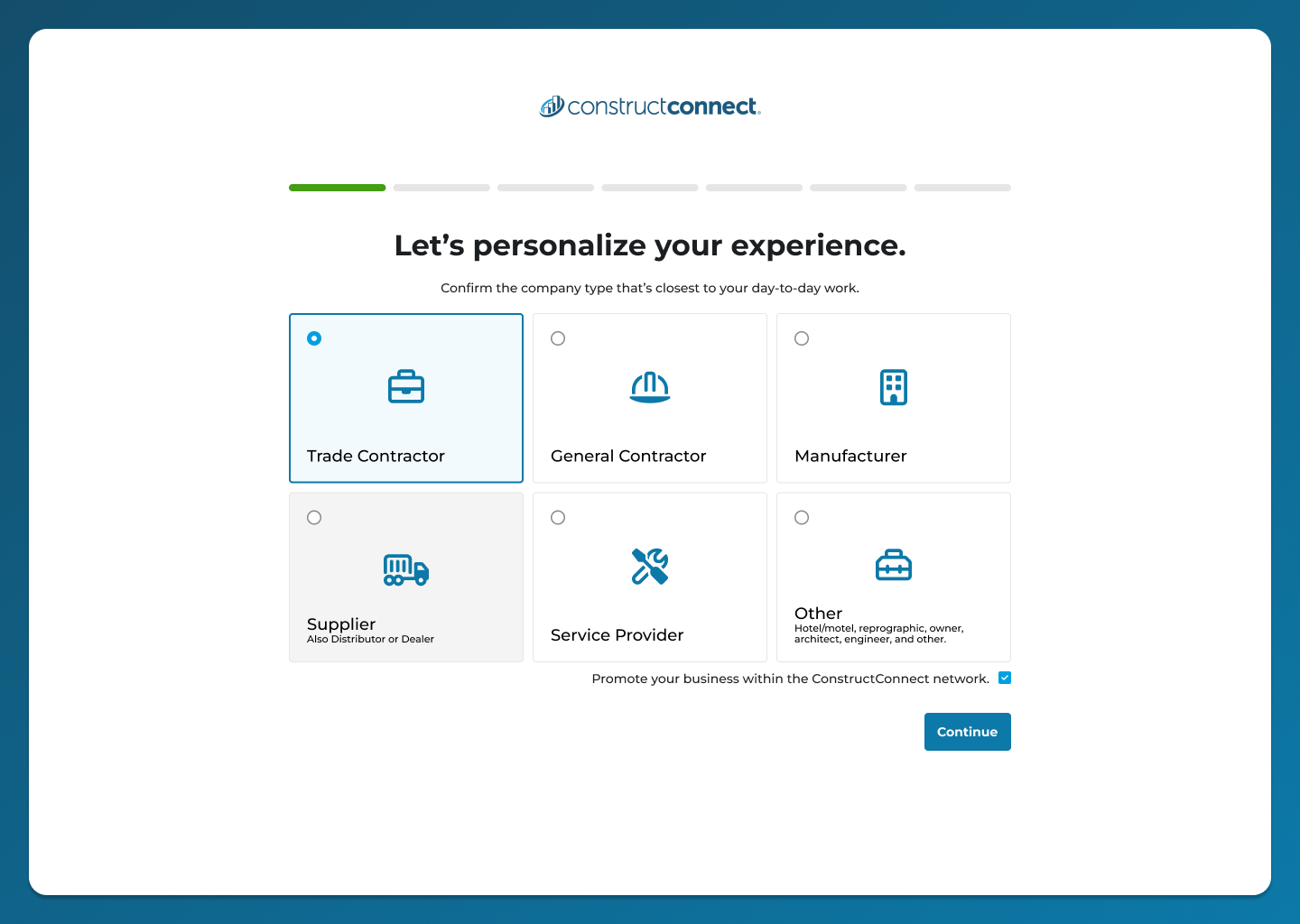
Screen 1 of 7, company type confirmation. Sets the branching path for the rest of the wizard.
The dependency on reps for search setup was identified through a combination of support ticket volume and user interviews. Evidence, not assumption, that new users were getting stuck.
Rather than relying on discovery alone, the design was tested through structured usability testing before launch.
- Method: Unmoderated, think-aloud sessions via UserTesting
- Participants: 10, spanning 3 to 30+ years of construction industry experience across general contractors, plumbing, HVAC, and roofing trades
- Task: "You're a plumbing specialist in Atlanta looking for new projects to bid on. Complete the onboarding to set up your search."
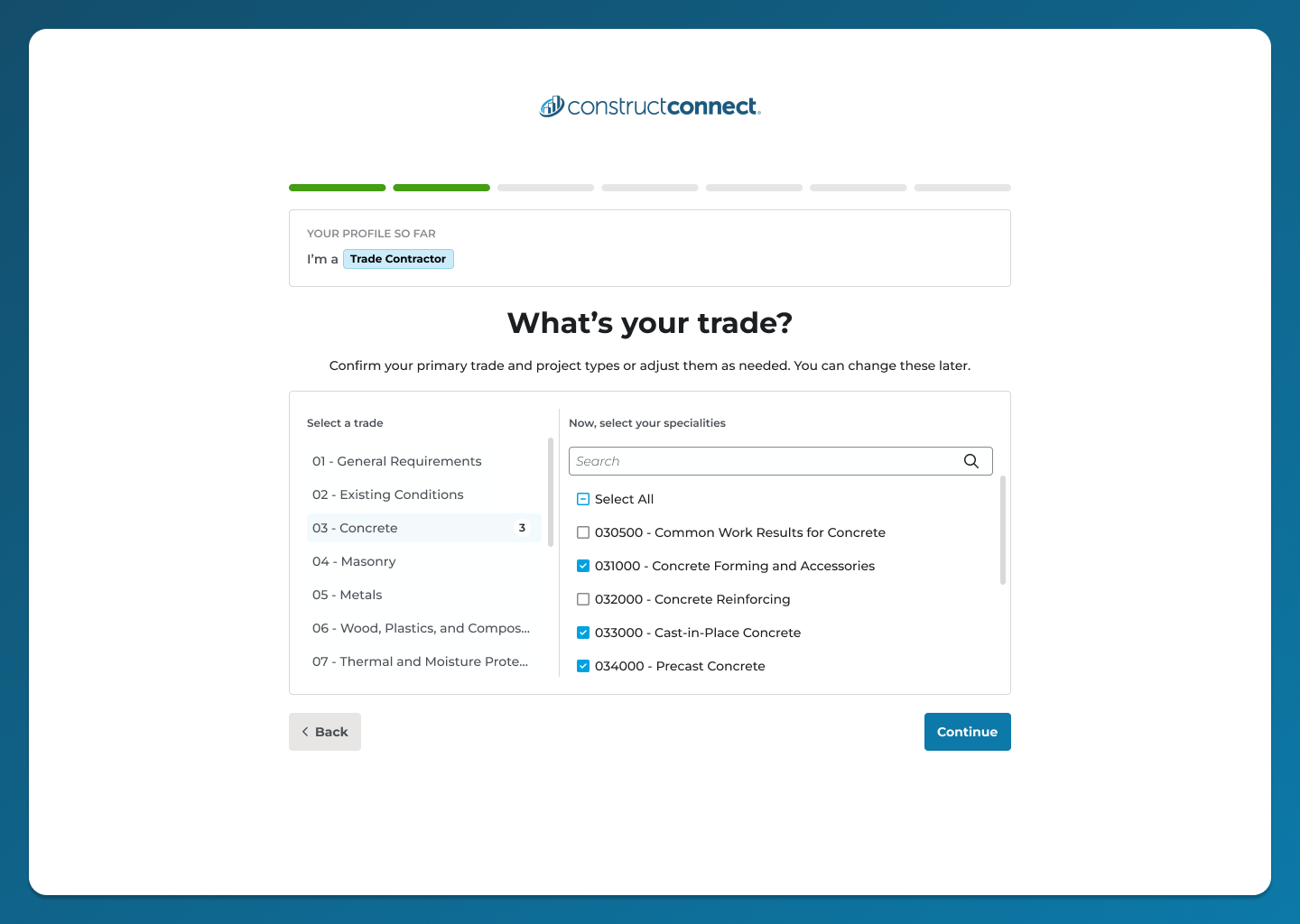
Trade selection, with specialties pulled from CSI codes.
The role and entitlement logic was mapped across 7 roles and 6 entitlement tiers, a matrix of 42 combinations, each with different landing pages, auto-email behavior, and search scope.
The flow itself moves through 7 screens: Company Role, Trade Selection, Project Stage Preferences, Service Area, Project Category, Keywords, and Confirmation.
| Metric | Target | Actual |
|---|---|---|
| Recall search steps | 60% | 100% |
| Predicted results as next step | 75% | 90% |
| Confidence conducting search | 75% | 90% |
| Understood input → output link | 75% | 100% |
What testing surfaced went beyond pass/fail. Six of ten participants explicitly praised the natural-language summary screen, unprompted, calling it a "mad lib" and a "mission statement." One participant fundamentally misunderstood the flow's purpose, flagged and addressed before launch. A meaningful minority expected onboarding to set up a persistent profile, not a per-search configuration, which became the project's central design decision. Twenty percent wanted multi-role selection, and a trade-dropdown edit bug was caught in testing before it reached production.
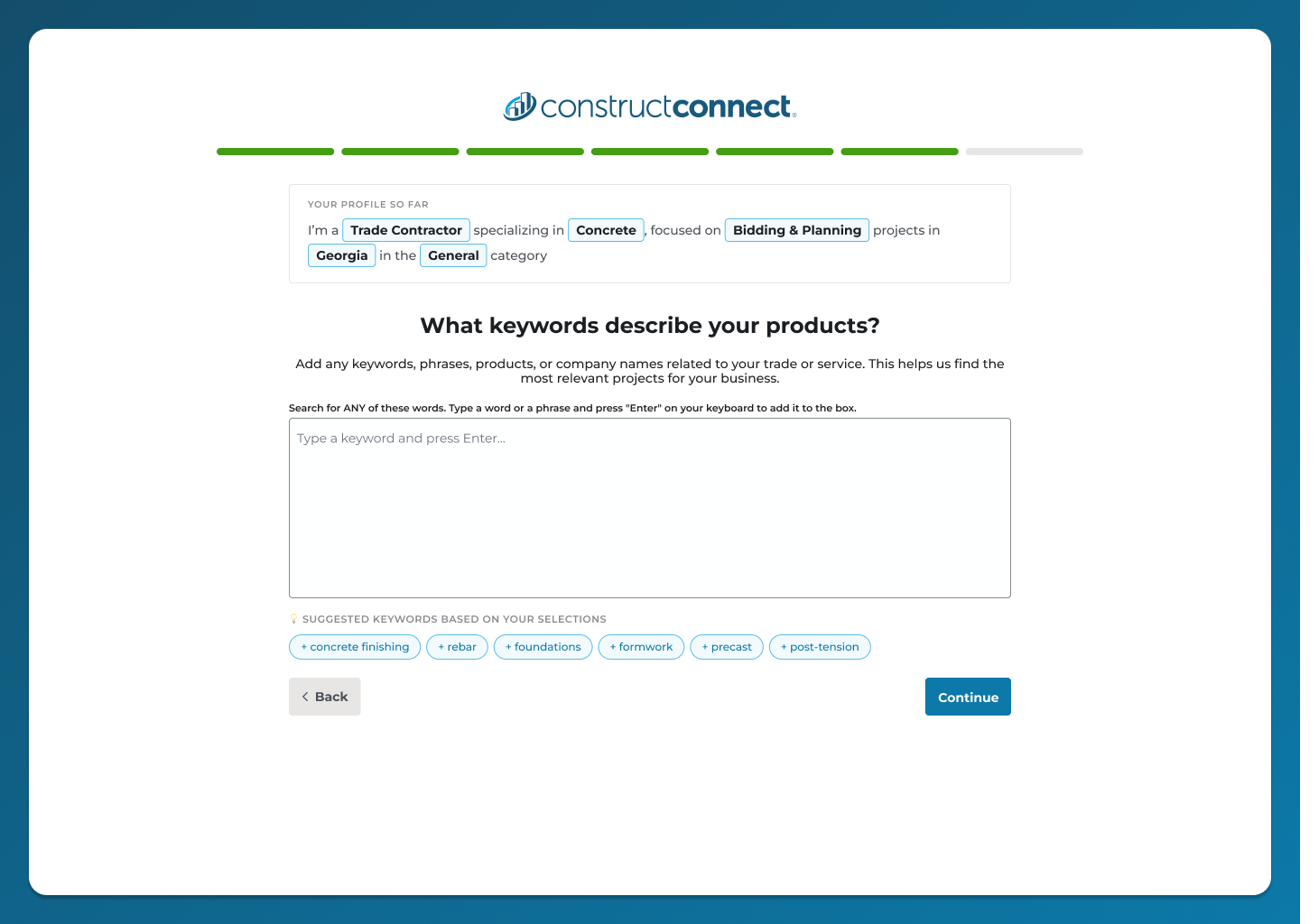
Keywords screen, AI-suggested terms capped at roughly 15, an explicit cost-versus-comprehensiveness tradeoff.
Resolving the "profile vs. search" mental model gap
Testing surfaced a real split in how users understood the flow. Most correctly treated it as configuring one saved search. A meaningful minority expected onboarding to set up a persistent company profile they'd never have to re-enter. This wasn't a copy problem, it was a genuine fork in product strategy: rebuild onboarding as a true profile, fix it through messaging alone, or land somewhere in between.
We shipped both, cheaply. The wizard updates the user's actual profile and creates a default saved search literally named "My Profile." Users get the language and mental model they expected while the underlying object stays a fully editable, reusable search. It's the hybrid the research pointed to, solved through naming rather than a heavier rebuild.
Progressive reduction for low-fit roles
Users who select "Other" as their role skip all 5 middle screens, moving straight from Company Role to Confirmation with no searches created. Rather than forcing irrelevant steps, the wizard still shows a consistent start and end, so the completion pattern stays uniform across every role.
Caught our own assumption mid-build
General Contractors were originally excluded from the Trade Selection screen. We caught that restriction ourselves during build and corrected it before it ever shipped, the kind of check that's easy to skip under deadline pressure.
Entitlement-gated document search, not feature-hidden
Project Intelligence Starter users don't get Documents in keyword search results, but they still see the Keywords screen and get a working search, just narrower in scope. The design choice was to degrade gracefully rather than hide the step entirely.
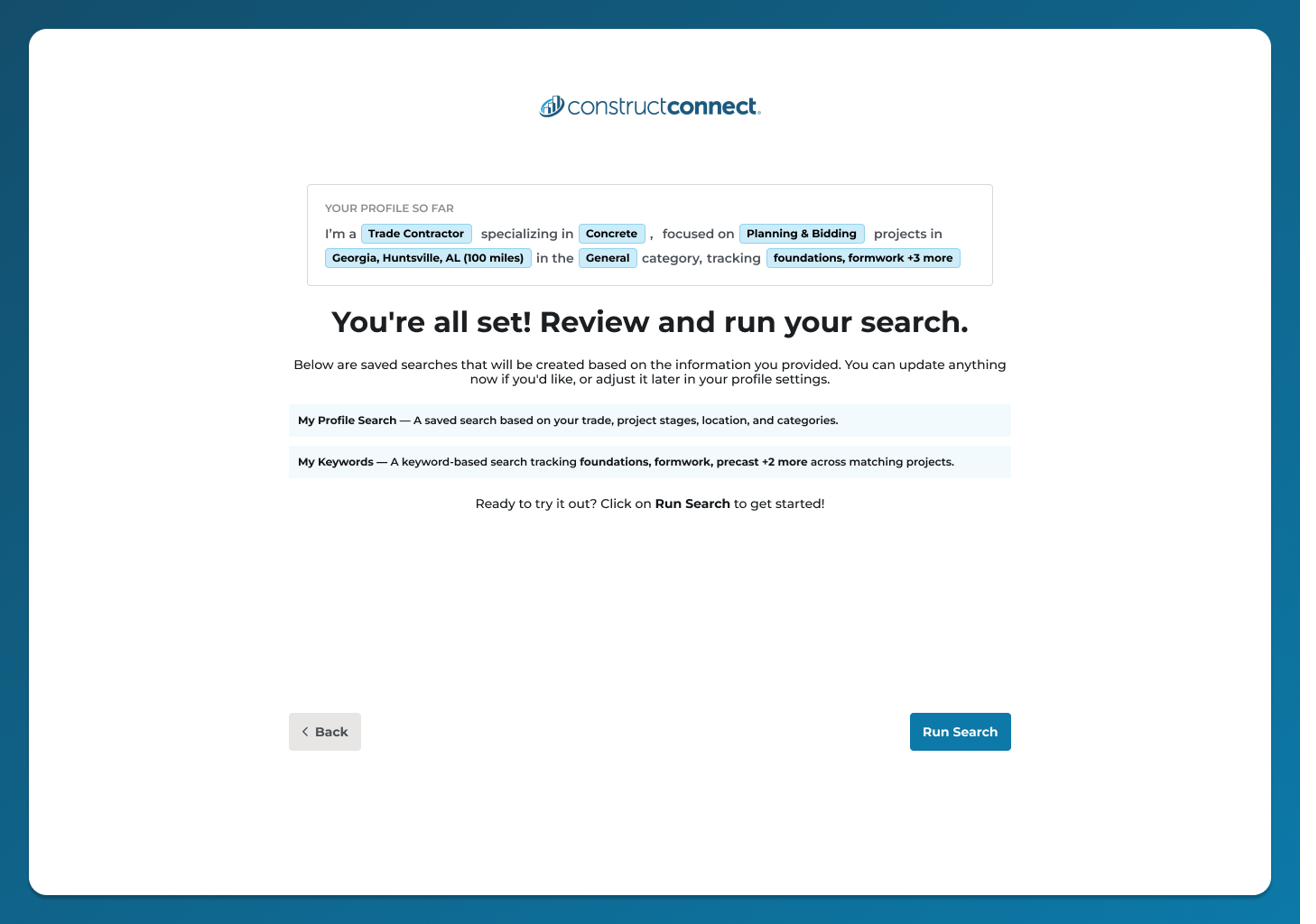
Confirmation screen. "My Profile Search" is the naming decision that resolved the mental model gap without an architecture change.
Guided Onboarding walks new users through a 7-screen guided wizard covering role, trade, project stage, location, category, and optional keywords, then closes with a natural-language summary of the search it's about to create. Every field in that summary is directly editable before confirming, so the "black box" feeling of an AI-assisted flow never sets in.
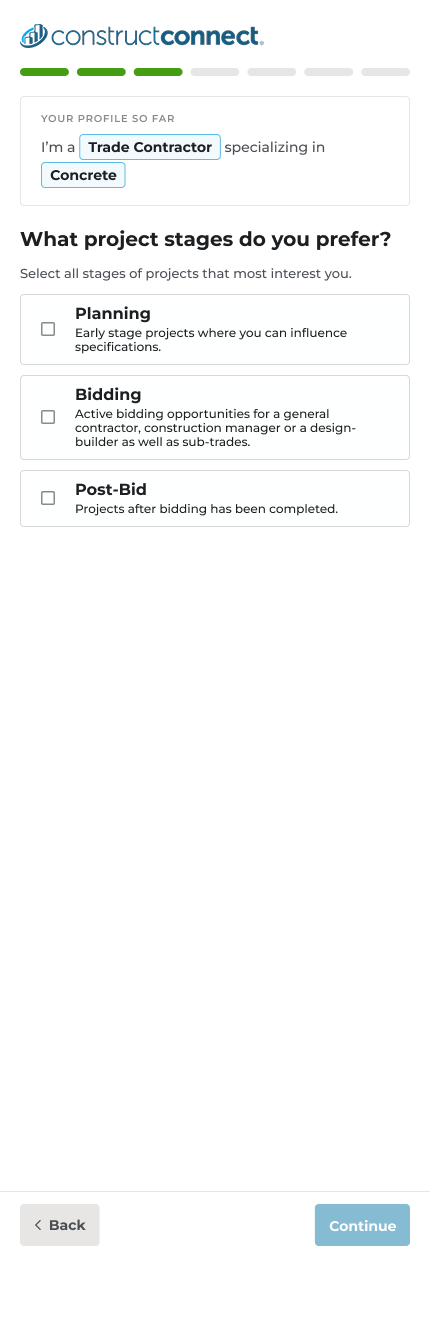
The same flow, adapted for mobile.
Shipped June 2026. Early results from Pendo, roughly two weeks post-launch based on 286 users:
25.8% of users who completed onboarding went on to view a curated project match afterward, the clearest signal that onboarding led to real value, not just flow completion. Sample size is still small, worth another pull once more time has passed post-launch for a sturdier read.
What worked: Partnering outside my usual squad forced a cleaner handoff discipline than I'm used to. Nothing could depend on context that only my own squad had. The usability testing investment paid for itself directly: it surfaced the profile-vs-search tension before launch, not after, and gave us a cheap way to resolve it through naming instead of a rebuild.
What I'd do differently: Instrument before you replace, not after. When I went looking for a baseline to measure Guided Onboarding against, the old onboarding page had never been tagged in Pendo. There was no historical funnel to compare to. That's an easy trap: the moment you know something's getting replaced is exactly the moment to make sure you can still measure what it used to do.
What this unlocked: A repeatable template for testing onboarding work before it ships rather than after, and a case for unmoderated think-aloud testing as a standard step rather than an occasional one.